Google Business Profile Performance Report: Is It Accurate?
As a small business owner, creating, claiming, and optimizing your Google Business Profile (formerly known as Google My Business) is an important step in boosting your small business’ search engine rankings. A Google Business Profile (GBP) offers companies several tools and features that can be used to increase visibility within Google Search and Google Maps, as well as boost overall website traffic.
One of the popular features included with your Google Business Profile is the Performance report. However, from our experience working with hundreds of small businesses across the nation, this report is often misunderstood, frequently causing more confusion than benefit. Keep reading to learn more about the benefits, accuracy, and limitations of GBP's Performance Report.
Table of Contents
- What Is the Google Business Profile Performance Report? (Previously Called Insights)
- Is the Google Business Profile Performance Report Accurate?
- How AI Makes Reporting More Complicated
- Track Conversions Instead of Views and Clicks with a Platform Agnostic Tracking Tool
- Other Tools for Tracking and Improving Your Online Visibility
What Is the Google Business Profile Performance Report? (Previously Called Insights)
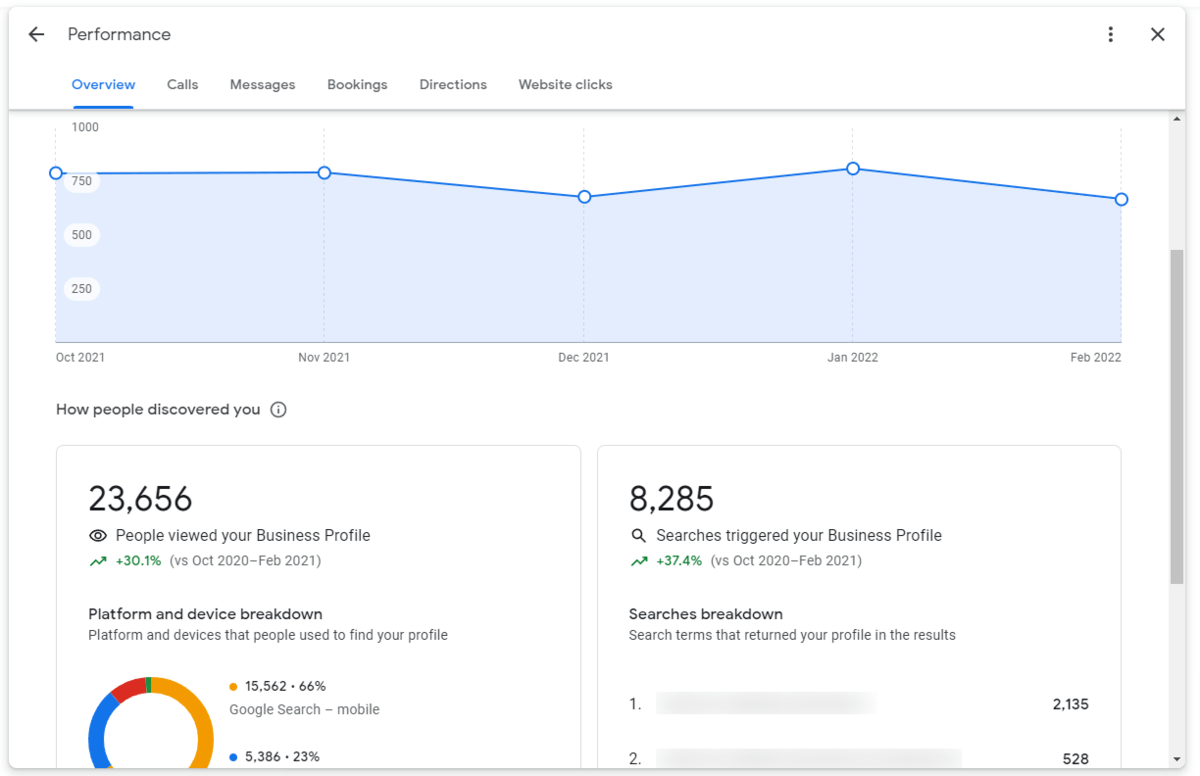
Google Business Profile's Performance report was designed to help small business owners discover how customers interact with their business listing on Google. Data provided by the GBP Performance report includes information such as:
- Where customers find you on Google (e.g. Google Maps or Google Search)
- What devices the viewer is using (desktop vs. mobile)
- Popular keywords used to find your GBP listing (Searches Breakdown)
- How many times customers have viewed your GBP listing
- Volume of various actions customers take specifically through your GBP listing including calls, bookings (if enabled through a supported third-party), direction requests, and website clicks.
How to Access the Google Business Profile Performance Report
You can find your own Google Business Profile Performance report by following the steps below:
- Ensure you are logged into Google via a user account that has access to manage your company.
- Either search for your business name on Google or visit https://business.google.com/locations and login.
- If you're logged in with the correct account, you will see the following icons at the top of your search.
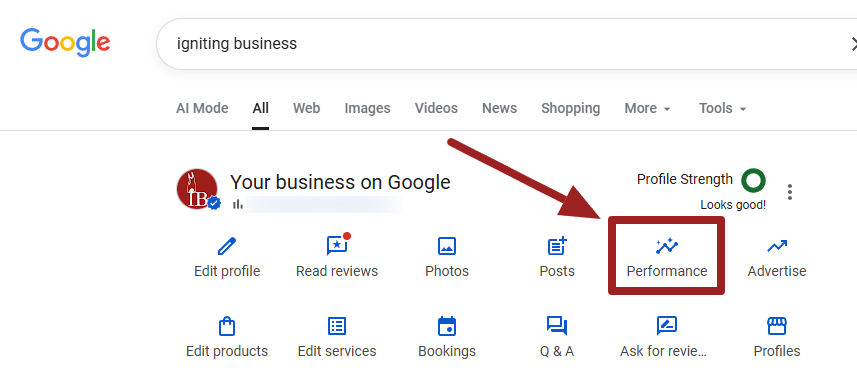
- Select "Performance" to view the report.
Is the Google Business Profile Performance Report Accurate?
At first glance, the Performance report appears to provide valuable information that can help your small business understand your customer activity online. However, despite providing good information, it is important to know that the Google Business Profile Performance report only captures a limited portion of your small business’ total customer interactions within Google.
Discover a few limitations of the Performance report below:
Data History
A major limitation of GBP Performance data is the historical window is limited. The data found within GBP Performance only represents the past 6 months of data. 6 months is actually an improvement since prior to 2020 the data was limited to the most recent 90 days.
However, with only 6 months of data, it makes it nearly impossible to track performance over the entire year or compare current year data to prior year data to illuminate whether an issue is a trend or simply a seasonal fluctuation.
Phone Calls
While GBP Performance claims to provide information on the phone calls your small business receives, the number of calls is not fully representative of all calls you receive from the search engine. GBP Performance data only captures the phone calls made from customers that use the click-to-call action button on the listing. Naturally, that will mostly include users on smartphones, and not all smartphone users will even use the click-to-call feature.
As a result, you likely have many more phone calls occurring from those that view the phone number from a desktop or tablet and dial from their phone, or from others who simply write down the phone number to call it later.
According to Google's documentation, calls track "The number of times a customer clicked on the call button on your Business Profile."
However, a previous version of the same documentation in 2022 stated (bold emphasis mine), “[phone calls] represents the number of clicks on the call button on your business profile. If the user copies the number and dials it manually or ends the call before it connects, you may see discrepancies between number of Phone Calls on the [Performance] page and number of actual calls your business receives.”
You can see where the old version was actually more transparent with how their call tracking works and the limitations.
If you want more robust call tracking that can track whether a person clicks to call, dials the number manually, or navigates to your website then calls, you should check out our post on robust call tracking methods.
Business Profile Views
With GBP's Performance report, the number of views and website clicks for your business is also skewed. GBP Performance only shows the number of views and website clicks your Google Business Profile receives (either on Maps or within the organic search), not the overall views of your business on Google as a whole. For example, if your business does not pull up in the map pack, but it does in the other organic results, this will not be counted as a view within the GBP Performance report.
There are multiple surfaces where your Google Business Profile can appear. For instance, you might think of your Knowledge Graph (the large side panel on desktop or typically at the top of mobile) that features only your business information when you search your specific company name (type in "Igniting Business" to see an example).
Additionally, views also "occur" when your business is lumped in with a larger set of companies listed, even if your business goes completely unoticed by the viewer.
For example, your view count also includes when your business pulls up as one of the, typically three, options in the local pack, on the expansive local finder listing numerous businesses, or even within the small, often missed, "people also search for" section at the bottom of your competitor's knowledge panel.
Website Clicks
Google states that website clicks within the Performance report are "the number of times people clicked on the website link on your business profile." This is a fairly accurate statement. But again, keep in mind that your business profile does not power the organic results in Google. Thus, it's important to remember that this website clicks metric only includes one piece of the pie in terms of your visibility within the search engine result page (SERP).
How AI Makes Reporting More Complicated
To add a layer of complexity, as Google is increasing the prominence of AI Overviews and AI Mode, the traditional local pack on Google is seeing far fewer views overall. Instead, Google is showing business recommendations (when it sees fit) within the AI Overview that references data within your Google Business Profile. However, Google is struggling to share or provide consistent documentation on how data within AI powered features are being tracked.
As a result, you might see lower stats in your Performance report purely due to the shift of user interactions from traditional search results (including the local pack and Google Maps) to AI powered results.
However, with platform agnostic advanced conversion tracking tools like WhatConverts, you can actually track conversions that occur as a result of AI platforms as well.
Track Conversions Instead of Views and Clicks with a Platform Agnostic Tracking Tool
Instead of relying so enthusiastically on impressions (views), clicks, and flawed call tracking, consider implementing a robust tracking system that can track conversions (phone calls, form submissions, text messages, transactions, etc.) and where the leads originate.
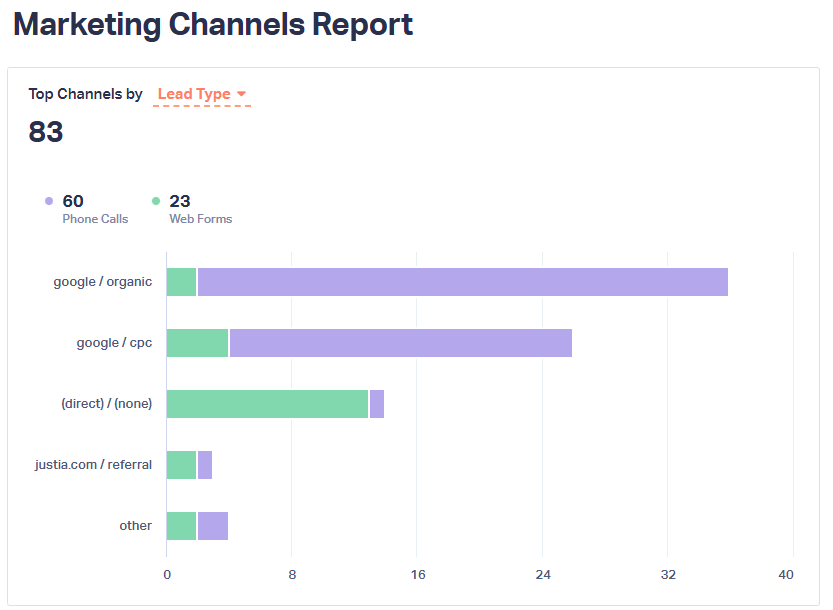
Our favorite conversion tracking tool to do this is called WhatConverts, and it's what we use here at Igniting Business every day for ganular reporting and to spot overarching performance trends.
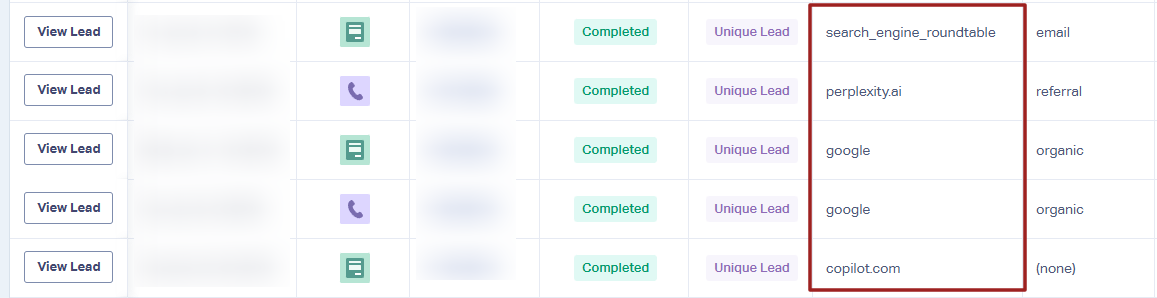
If you want to identify whether or not you're seeing a decrease or increase in business, and ultimately what marketing avenue is leading to those results, you need to step outside of the limited platform-specific reports (including the GBP Performance report) and use advanced conversion tracking instead.
Other Tools for Tracking and Improving Your Online Visibility
Two of our favorite SEO and online visibility tools are BrightLocal and Semrush. Both of which have advanced mechanisms to track interactions on your Google organic results, assess site quality, as well as monitor your Google Business Profile.
BrightLocal is more focused on Local SEO, including citation building, data aggregator submissions, review collection, GBP monitoring, and exceptional rank tracking.
On the other hand, Semrush is a robust technical SEO site auditing tool that also assists with content marketing, backlink research and building, rank tracking, and overall site health monitoring.
Both of the above platforms offer free trials if you are interested in checking out the tools.
To learn more about SEO and digital marketing, consider subscribing to our free monthly newsletter.
At no additional cost to you, we may receive a commission if you click on some of the links on this website and make a purchase.