Hidden Advanced Google Business Profile (GBP) Settings You Can’t Ignore
Thousands of articles exist on how to optimize your Google Business Profile (GBP), ranging from category selection and service areas to profile completion and Google post creation. However, there are several advanced settings that are buried where most small businesses will never know they existed.
Based on our experience managing hundreds of Google Business Profiles over the years, we describe several advanced settings you absolutely must change and monitor to avoid headaches down the road.
Table of Contents
How to Find Advanced Settings within Your Google Business Profile
To find the advanced settings for Google Business profiles, follow the steps below:
- Ensure you are logged into the correct Google Account that manages your Google Business Profile.
- Navigate to https://business.google.com (preferred) or search for your business name on Google (multi-location businesses may have to add the city name as well).
- This should load your Google Business Profile control panel.
- Instead of clicking one of the icons that you would use for other activities, click the three dots in the upper righthand corner
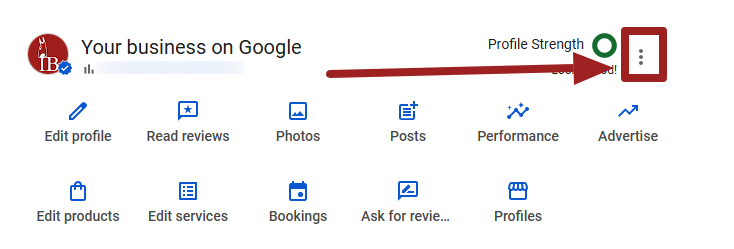
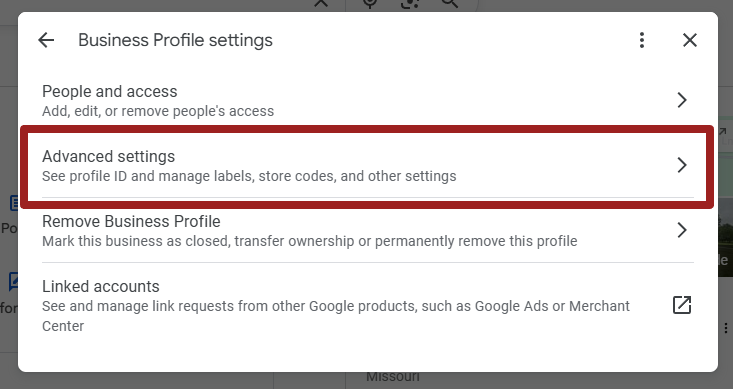
- Select Business Profile settings.
- Select Advanced Settings.
Advanced GBP Settings You Should Check and Likely Change
Here you will see multiple settings that most businesses will not adjust from the defaults. Below we list what each setting does and our recommended setting for most small businesses.
Note that you might have a unique use case for changing the settings from our recommendations.

Bookings and Inquiries from Customers
This allows Google to make automated calls, texts, and WhatsApp messages to your business to request bookings as well as request service information and pricing. This is essential for Google’s newer agentic AI features to operate and interact with your business via calls and text messages.
We recommend enabling “Bookings and Inquiries from Customers.”
Keep Your Profile Up to Date
Google may use automated calls, texts, or WhatsApp messages to the number listed on your Google Business Profile to verify information like hours of operation, services, and more. Based on the information provided by the person who answers your business phone, Google will then update your profile without any additional review or approval.
This is dangerous in our opinion as anyone who happens to answer the phone for your business can inadvertently give incorrect information to Google, thereby updating your profile.
In certain edge cases, if Google rolls out a change to your listing (based on this collected data from a phone call/text message), then you change it back, you risk your listing entering unverified status or suspended altogether.
We recommend disabling “Keep Your Profile Up to Date.”
Post to Your Profile on Your Behalf
This is a new feature in 2026 that allows Google to create and post content on your business profile based on data it gathers via an automated call, text, your website data, and/or your linked social media accounts.
While this feature is still relatively new and its features are still developing, this again opens you up to undesired information being posted on your profile that you did not review.
We recommend disabling “Post to Your Profile on Your Behalf.”
Don’t Show Phone Number
This section can be a bit confusing at first. Essentially, this section should be labeled “Don’t Show Phone Number,” but it’s just labeled right now as “Phone number.” In my two decades of doing web design and SEO, I haven’t seen a good reason you would want your phone number hidden/not shown on your Google Business Profile. Yet, it’s very easy to accidentally toggle this setting and make your phone number disappear.
We recommend keeping the Don’t Show setting disabled.
Share Data
This setting allows Google to share data of your Google Business Profile with other Google products like Google Analytics and Google Ads to surface additional recommendations.
We recommend enabling this setting unless you have a privacy-related reason to avoid using this feature.
Google Says It Will Give You a Chance to Review Changes – Don’t Count on It!
In the automated calls and text messages section of advanced settings, Google states, “…you’ll be able to review any changes before they’re made.”
In our experience managing our own listing and hundreds of small business listings for our clients, Google does not notify you via email of these pending changes consistently.
Google may display a notice on your Google Business Profile about certain types of pending changes, but then those get auto-accepted overtime or can be accidently accepted by another team member attempting an unrelated change.
New Development in Progress: as of April 2026, Google has stated they are rolling out a new “proactive” notification system that is supposed to allow business owners to review important edits to their business profile.
Even so, you should not count on these notifications from Google. You must regularly audit your Google Business profile settings and details to ensure accuracy.
How to Actually Get Notified of Google Business Profile Changes
If you want to maintain your Google Business Profile and setup automatic alerts if a change is detected, you can use third-party tools which are far more reliable. Semrush has a very robust local listing management tool that monitors and syncs changes on your Google Business Profile as well as 150+ global listings.
If you want a more affordable solution focused on Google, Whitespark has a very affordable Local Platform that can monitor and sync changes. Similarly, BrightLocal offers Active Sync which syncs to a handful of key profiles, including Google Business Profile.
These tools can help monitor and optimize your Google Business Profile. While they give you some immediate peace of mind, they do not completely replace regular audits of your Google Business Profile.
For more SEO tips like these, consider subscribing to our free monthly newsletter. We send SEO, web design, and marketing tips tailored for small business owners and busy multi-discipline marketers.
At no additional cost to you, we may receive a commission if you click on some of the links on this website and make a purchase.