Microsoft Launches AI Powered Brand Agents for Shopify E-commerce Stores
In January 2026, Microsoft officially announced multiple new AI-focused features including the launch of Brand Agents (Beta) for Shopify stores. Brand Agents is a conversational AI shopping assistant designed to interact with customers and help boost sales.
Brand Agents is product nested within Microsoft Clarity, which is a broader set of conversion rate optimization (CRO) tools designed to help businesses improve their website’s user experience.

Our article discusses the various features of Brand Agents, why we think this tool can be useful for small businesses, various caveats, and how to join the Beta waitlist.
Table of Contents
- How Does Microsoft Brand Agents for Shopify Work?
- Why Should Small Businesses Consider Using Brand Agents
- How to Sign Up for Beta Access (Waitlist) and Install Brand Agents
- Don’t Forget to Update Your Privacy Policy, Cookie Policy, and Terms of Use
- Common Questions About Using Microsoft Brand Agents
- Stay Updated on Other Tools and Internet Marketing Topics
How Does Microsoft Brand Agents for Shopify Work?
Essentially, Microsoft’s Brand Agents use Microsoft’s Copilot AI (which is powered by OpenAI’s GPT models, the same family behind ChatGPT). Copilot’s AI will train the Brand Agent on your website’s content and allow it to directly respond to customers’ questions via a chat bubble that will appear directly on your website.
Demonstration video supplied by Microsoft Clarity
While AI chatbots are not perfect by any means, Brand Agents can still be quite effective. Imagine an employee that can memorize each of your 300 products descriptions and specifications, along with countless FAQ’s and other webpages. Additionally, Brand Agents try to use the same tone of voice used within the rest of your content and can be further tailored through additional inputs to manage greetings, theme, and voice.
In the near future, Microsoft will also allow you to upload additional reference materials privately, so the agent incorporates non-public expertise if desired.
Why Should Small Businesses Consider Using Brand Agents
Brand Agents can operate as a 24/7/365 customer service tool trained fully on your own website’s content. If your team gets bogged down with questions via calls, website chats, or emails regarding differentiations between products, questions about shipping and return policies, asking for product recommendations, etc., you may benefit from using Brand Agents.
Demonstration video supplied by Microsoft Clarity
Even if you have already documented answers to those questions on various FAQ sections, policy pages, etc., not all of your users will navigate and actually read those sections.
However, using Brand Agents, customers will have access to a context-aware AI-powered agent that can answer those repetitive questions and guide the customer to completing a transaction.
Additionally, via Microsoft Clarity, you’ll see statistics on how your Brand Agent is engaged and the impact it has on your e-commerce store.
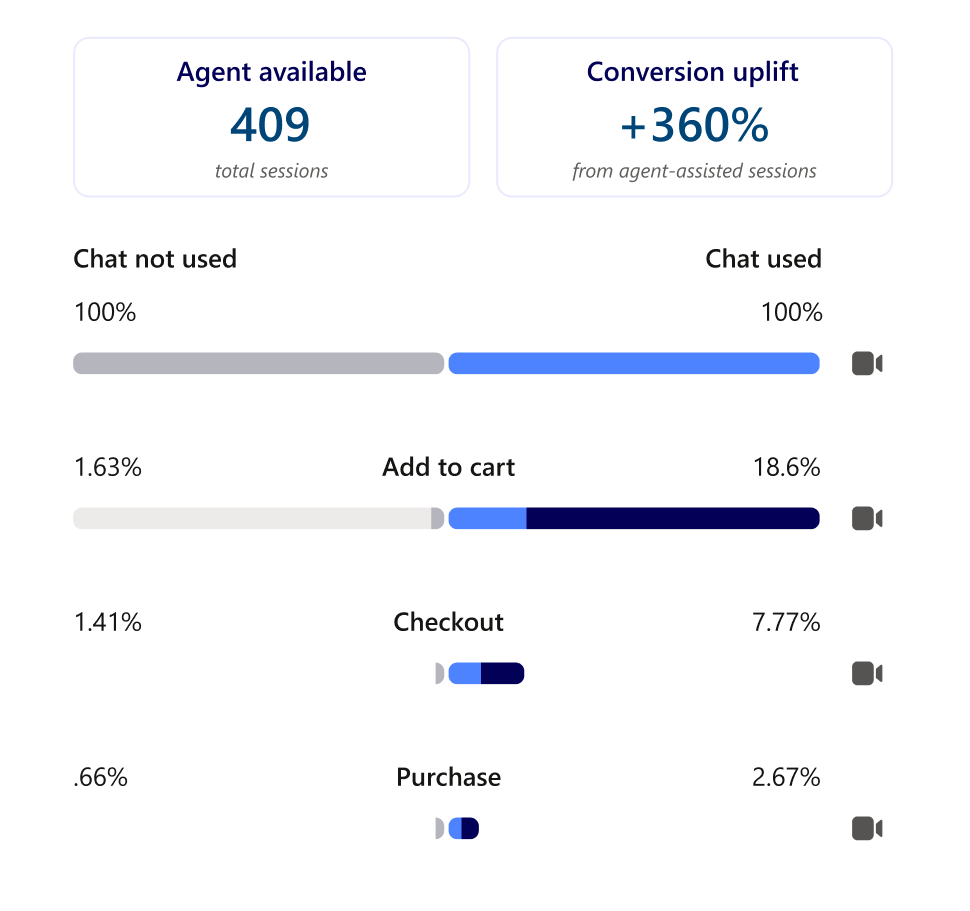 Statistics example supplied by Microsoft Clarity
How to Sign Up for Beta Access (Waitlist) and Install Brand Agents
Currently, Brand Agents is in Beta, and you must sign up for their waitlist to be considered. Since Brand Agents is a feature within Microsoft Clarity, you’ll need to use Microsoft Clarity on your Shopify website to initially express interest in the waitlist.
To do so, you can follow these steps provided by Microsoft.
After signing up for the waitlist, you will receive a confirmation email when you’re approved and ready to get started.
Don’t forget to review and update your policies as a part of rolling out Brand Agents.
Don’t Forget to Update Your Privacy Policy, Cookie Policy, and Terms of Use
Naturally, Brand Agents and Microsoft Clarity collect customer data via chats and may leverage cookies for functionality purposes. As a result, it’s critical that you comply with any and all regulations regarding customer privacy.
We always recommend that you talk to an attorney who can provide legal guidance regarding your responsibilities and obligations.
Additionally, you can leverage tools like the Pandectes GDPR Compliance app for Shopify, or Termly’s compliance solutions. Both of which can help you manage your customers’ consent preference and assist with privacy policies. However, using these tools alone won’t make you compliant; make sure you consult with a qualified attorney!
Common Questions About Using Microsoft Brand Agents
The following are common questions and our insights regarding using and deploying Microsoft Brand Agents.
Do I Have to Install Microsoft Clarity to Use Brand Agents?
Yes, you must have a Microsoft Clarity account as Brand Agents is one tool within the Clarity software suite. Microsoft requires you to install Clarity to also utilize Brand Agents.
Keep in mind that if you are using a conversion rate optimization (CRO) tool like Brand Agents, you really should review and update your policy pages.
Can I Use Brand Agents on Non-Shopify Websites?
Currently, Brand Agents are only available as early-access Beta on Shopify websites. However, I imagine if Microsoft finds this successful for Shopify and develops a profitable model to support more e-commerce systems, they’ll likely expand access in the future.
How Much Does Brand Agents Cost?
Microsoft Clarity is technically free. However, within Microsoft’s documentation, they state that “access to Brand Agents is completely free during the beta period. Pricing details will be shared with you in advance before the beta period ends, so you can plan with confidence.” Bottomline is Brand Agents is free now (during Beta), but it won’t likely be in the future.
Can I Install Brand Agents on My Own or Do I Need a Web Developer?
While Microsoft claims you can easily launch your brand agent on your own and that it doesn’t require coding, results may vary. If you’re quite technically savvy, you may be able to deploy it on your own. If you have a web developer, we recommend talking to them to make the integration smoother and ensure the implementation doesn’t impact other functions on your website.
Can Igniting Business Help Me Install Brand Agents on Shopify?
Igniting Business can help existing clients with configuring and installing Brand Agents. However, we do not offer this as a standalone service. If you want one-time assistance, you could leverage a tool like StoreTasker or ShopExperts which connect you with a Shopify-specific specialist for one-off projects.
Stay Updated on Other Tools and Internet Marketing Topics
If you’d like to stay up-to-date on other useful tools and internet marketing topics, subscribe to our monthly newsletter. It’s packed full of actionable tips, useful tools, and timely updates.
At no additional cost to you, we may receive a commission if you click on some of the links on this website and make a purchase.