How to Link a Google Business Profile (GBP) to Google Analytics (GA)
In June of 2026, Google announced that businesses can now link their Google Business Profile (GBP) to their Google Analytics (GA) account. This connection allows a company to view and analyze interactions with your Google Business Profile directly within Google Analytics. Key Google Business Profile metrics including interactions, phone calls, bookings, directions requests, and website clicks are included in the integration.
We’ve followed this linking process for multiple clients and wrote this article to outline the steps for linking GA and GBP, as well as point out several nuances and limitations.
Table of Contents
- Steps for Connecting Your Google Business Profile to Google Analytics
- How to View your Google Business Profile Data in Google Analytics
- Limitations of the Google Business Profile and Google Analytics Integration
- Level Up Your Reporting with True Conversion Tracking
- FAQ About the Google Business Profile and Google Analytics Integration
- Get More Digital Marketing and Integration Tips
Steps for Connecting Your Google Business Profile to Google Analytics
Follow the steps below to connect one or more Google Business Profiles to Google Analytics.
- Ensure you are logged into the Google Account that manages both your Google Analytics and Google Business Profile.
- Note that your Google account must have either Editor or Administrator role assigned for the associated Google Analytics property.
- Your Google account must also have Owner or Manager permission granted for the Google Business Profile(s) that you want to link.
- Nuance for Agencies: If you are an agency and utilize a GBP Agency Account, you may not see the ability to link profiles as individual users do have to be assigned correct permissions (not inherited from the agency account). For longevity, we recommend setting up the links via your client-owned account if at all possible.
- Login to your Google Analytics account and select the desired GA property (website).

- Click the Admin (gear Icon) in the lower left corner.

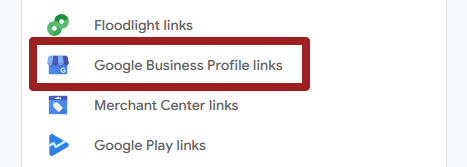
- Scroll down to the bottom of the page and click “Google Business Profile” links.
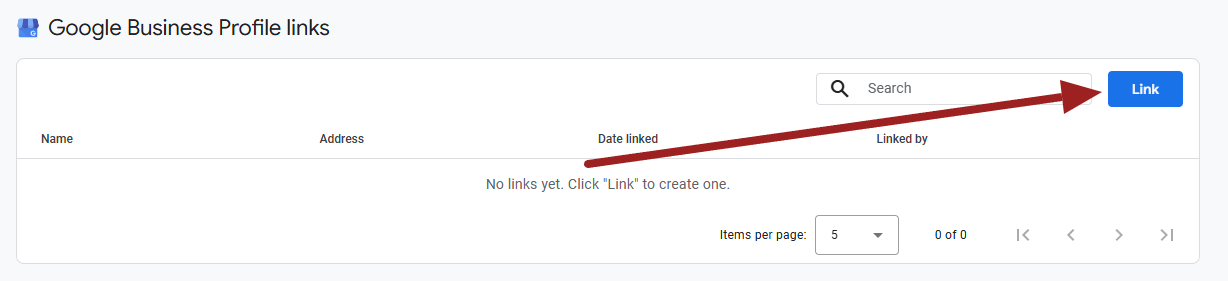
- Select the blue “Link” button in the upper right-hand corner.
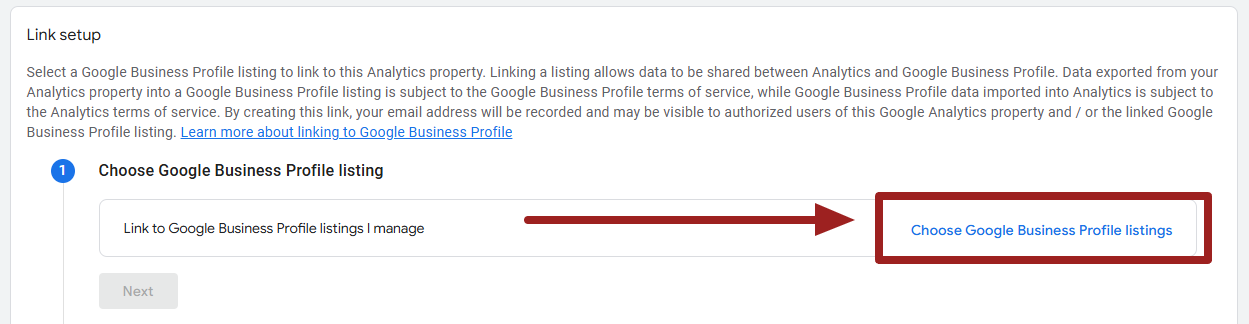
- Select “Choose Google Business Profile listings.” Here you will be shown all the Google Business Profile(s) for which you have the correct permission level (see step 1 if you don’t see your desired listing).
- If you’re a single-location business, you’ll select your single Google Business profile and click confirm.
- If you’re a multi-location business, you will select all applicable locations and click confirm.
- Double-check that you selected the correct Google Business Profile(s) that you want linked and click Next.
- Under Review and Submit, you can triple check your work, then click the Submit button.
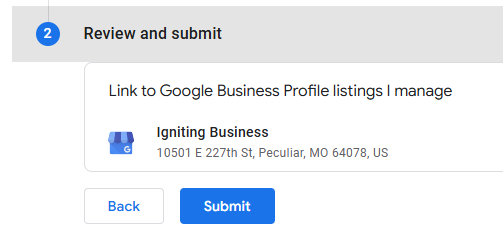
- You will then see a notice that the Link has been created. You can click the X in the upper corner to exit out of this screen and proceed to view your Google Business Profile data within Google Analytics.
How to View your Google Business Profile Data in Google Analytics
Once you completed the profile linking steps, you will now have a new section on the left-hand menu bar that says “Business Profile.” From here you can click the “Overview” to see the associated GBP reports.
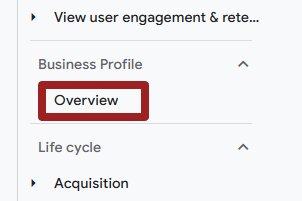
If you don’t see this new section yet, hard refresh the page. Sometimes it takes a hard refresh or log-in/log-out procedure to clear your cache to see the new integration.
Note that the reports are fairly limited at this time. However, it’s likely that Google will build this out with additional features in the future.
Limitations of the Google Business Profile and Google Analytics Integration
The following are limitations of the Google Business Profile and Google Analytics integration. Note that any items listed below stating “confirmed by Google” indicates that Google has publicly confirmed or voluntarily disclosed the limitation. Any limitations without this identifier are simply observed limitations from our own direct experience managing GBP listings and GA accounts on behalf of our clients.
Combined Multi-Location Data
In the case of multi-location business, when you link multiple Google Business Profiles to your Google Analytics data, the data becomes aggregated. There is not currently a way to segment or filter the data by an individual location at this time.
This is a severe limitation in our opinion for multi-location businesses, and we hope that Google will address this issue by adding appropriate filtering and segmentation options in the near future.
Confirmed by Google
Data Accuracy Awareness
As a reminder, the data contained in the Google Business Profile report does not capture the full scope of interactions. For example, if someone is looking at your GBP on a desktop computer and dials your number on their smartphone, the call will not be tracked. You would need call tracking with dynamic number insertion to accomplish this task.
There are other nuances to the limited reporting that are not well spelled out, and we don’t want business owners and decision makers to complete decisions without knowing the limits. Please take a look at our full report on the accuracy of Google Business Profile Performance reports.
Data Retention
Google states that the data contained in the report “…are available for the last 6 months.” This is inaccurate. While it’s true if you view these stats directly within the Google Business Profile Performance report, you will only see 6 months of data.
However, when viewing the data in Google Analytics, it uses the full API which unlocks roughly 18 months of data based on our testing.
Limited Customization
Google Business Profile metrics cannot currently be used in explorations, comparisons, or have filters applied.
Have some grace and patience here, as Google has just rolled out the integration. If they see users are utilizing this feature with positive feedback, they will likely add more customization options.
Confirmed by Google
Delayed Data Freshness
When a change is made on a Google Business Profile (e.g. address changes), they will be reflected in Google Analytics after a “short delay.”
Confirmed by Google
No Support for GA Subproperties
The GA and GBP integration does not currently support subproperties at this time.
Confirmed by Google
Clarification: Not Truly Conversion Tracking
While integrating Google Analytics and Google Business Profile is useful, it should not be seen as conversion tracking. The system cannot fully track lead conversions and all sources. Instead, you would need a platform agnostic conversion tracking tool that can track conversions from GBP, Google organic, social platforms, ad campaigns, LLMs, etc.
With quite a bit of work, you can certainly configure GA to track conversions on several types of platforms, but there are multiple limitations that make this impractical for many businesses lacking advanced technical resources. Instead, we prefer using a conversion tracking tool like WhatConverts.
Level Up Your Reporting with True Conversion Tracking
While rolling out this integration is definitely a move in the right direction for Google, it’s only one piece of the puzzle. In addition, we recommend implementing a robust conversion tracking tool, WhatConverts. WhatConverts is what we use here at Igniting Business for our own conversion tracking needs as well as for client reporting. This tool can track phone calls, form submissions, texts, chats, appointment bookings, transactions, and more across all platforms, not just Google.
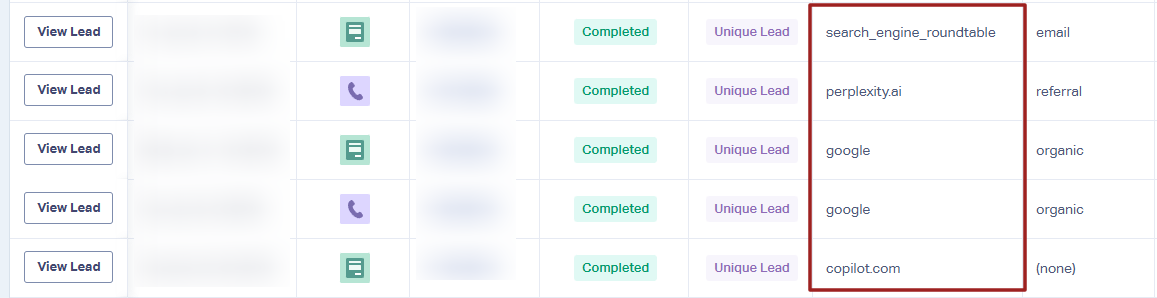
You can give WhatConverts’ free trial a spin if you’re interested in leveling up your conversion tracking.
FAQ About the Google Business Profile and Google Analytics Integration
The following are a few common questions we’ve heard regarding the Google Analytics and Google Business Profile integration. We’ll expand this list as we hear more questions come our way.
Will Connecting My Google Business Profile and Google Analytics Boost My SEO?
No. Implementing the Google Business Profile and Google Analytics link will have no effect on your SEO. However, it may make it easier for your team, or contracted third-parties, to view and analyze GBP and GA data in a centralized location.
Is the Data Pushed from GBP to GA Accurate?
Technically, the data pushed from GBP to GA does not change as the data is pulled over from one system to the other. However, there are notable limitations to how the GBP Performance data is both recorded and communicated to small businesses. If you’re a decision maker, you need to fully understand these limitations.
Why Can’t I See My Google Business Profile When Trying to Link It to Google Analytics
If you can’t see the correct Google Business Profile in the list of profiles to link to, you may not have the correct permissions on either the GBP or GA. Re-read the permissions nuances on Step 1 and double check your permissions in both GBP and GA.
Get More Digital Marketing and Integration Tips
If you benefited from these instructions, consider reaching out to let us know. It truly makes our day when we hear positive feedback on the resources share. If you also want more resources like this delivered directly to your inbox on a monthly basis, you can subscribe to our free newsletter.
At no additional cost to you, we may receive a commission if you click on some of the links on this website and make a purchase.